
Google AdsLocal Services17 min read
Google Ads vs Local Services Ads: Pay Per Click or Pay Per Lead Now That LSAs Are Moving Into Google Ads
Google is moving Local Services Ads into Google Ads as Performance Max campaigns with pay-per-lead goals, in phases running into 2027. Here's how paying per lead compares with paying per click, and how to tell which one actually books you more jobs.
The Social Stellor Studio · Creative Team
Google Ads and Local Services help pages were checked on November 24, 2026. The migration is still rolling out. All example businesses and numbers are hypothetical.

In this guide
 Google Ads
 Google Business Profile
 Google Maps
If you run a plumbing, HVAC, roofing, cleaning or other local service business, you've probably been offered two ways to advertise on Google: regular Google Ads, where you pay when someone clicks, and Local Services Ads, where you pay when someone calls or messages you. In 2026 that choice got more confusing, because Google started moving Local Services Ads into Google Ads itself.
The short answer is that the two still work very differently, and the right choice depends less on which one has the cheaper lead and more on which one turns your budget into booked jobs. This guide explains what Google has changed (and what it hasn't yet), how each option charges you, and gives you a worksheet for comparing them with your own numbers. Every example business and figure in it is hypothetical.
- Local Services Ads are being migrated into Google Ads as Performance Max campaigns with pay-per-lead goals. Google's published timeline has a first phase beginning in August 2026 for select US advertisers, broader groups in late 2026, and non-US accounts and remaining categories in 2027. Google's page doesn't say any phase is complete.
- You still pay only for valid leads, ads still show only on Google Search and Google Maps, and there are still no keywords. Manual bidding, manual lead disputes and BBB callouts are gone after migration.
- Regular Google Ads Search campaigns charge per click and let you choose keywords, ads and landing pages. You pay for the visit whether or not the person contacts you.
- Compare the two on cost per booked job, not cost per lead. In our hypothetical example, the channel with the cheaper lead ($40 vs. $60) cost more per booked job ($200 vs. $120).
- Before your account migrates, download your Local Services Ads reports. Google's download doesn't include impressions or clicks, and the old dashboard closes after migration.
The Short Answer, by Situation
| Your situation | Where we'd start | Why |
|---|---|---|
| You're in an eligible US home or storefront service category, with a verified Google Business Profile and good reviews | Pay-per-lead (Local Services Ads) | You pay only when a customer contacts you, and in many categories you can earn the Google Verified badge. Setup needs no keyword research. |
| You want specific jobs only (for example, water heater installs but not repairs) or high-value searches | Google Ads Search | Keywords, negative keywords, ad text and landing pages let you choose which searches you pay for. |
| You get plenty of leads but book too few of them | Fix response and qualifying first | Neither channel helps if calls go unanswered. Your book rate decides your cost per booked job. |
| You're already profitable on one channel and have budget to spare | Test the other alongside it | Google recommends running pay-per-lead campaigns alongside Search, Performance Max and Demand Gen. Compare them on cost per booked job. |
| Your category isn't eligible, or Local Services Ads aren't offered where you are | Google Ads Search | Pay-per-lead availability is limited by category and country. |
- Where we'd start
- Pay-per-lead (Local Services Ads)
- Why
- You pay only when a customer contacts you, and in many categories you can earn the Google Verified badge. Setup needs no keyword research.
- Where we'd start
- Google Ads Search
- Why
- Keywords, negative keywords, ad text and landing pages let you choose which searches you pay for.
- Where we'd start
- Fix response and qualifying first
- Why
- Neither channel helps if calls go unanswered. Your book rate decides your cost per booked job.
- Where we'd start
- Test the other alongside it
- Why
- Google recommends running pay-per-lead campaigns alongside Search, Performance Max and Demand Gen. Compare them on cost per booked job.
- Where we'd start
- Google Ads Search
- Why
- Pay-per-lead availability is limited by category and country.
If you're also weighing paid search against organic visibility, our guide to SEO vs. Google Ads for small businesses covers that decision. This article stays on the two paid options.
What's Changing in 2026–2027
Google's help page on the transition says Local Services Ads campaigns are being moved into Google Ads as Performance Max campaigns with pay-per-lead goals. It's a phased rollout, not a single switch. As of November 24, 2026, Google's page describes the migration in the future tense ("Over the upcoming months, existing Local Services Ads campaigns will be automatically migrated") and doesn't say any phase is complete, so don't assume your account has moved until Google tells you it has.
| When (per Google) | Who | Google's wording |
|---|---|---|
| August 2026 | Select US home and storefront service advertisers | "The first phase of the migration begins for select home and storefront service advertisers in the United States" |
| Late 2026 | Broader groups, including service-area businesses | "The migration expands to broader advertiser groups, including service-area businesses without physical storefronts" |
| 2027 | Non-US accounts and remaining categories | "Non-U.S. accounts, and all remaining business categories that weren't migrated in 2026 will transition to Google Ads." |
- Who
- Select US home and storefront service advertisers
- Google's wording
- "The first phase of the migration begins for select home and storefront service advertisers in the United States"
- Who
- Broader groups, including service-area businesses
- Google's wording
- "The migration expands to broader advertiser groups, including service-area businesses without physical storefronts"
- Who
- Non-US accounts and remaining categories
- Google's wording
- "Non-U.S. accounts, and all remaining business categories that weren't migrated in 2026 will transition to Google Ads."
Google says the account administrator listed on your profile gets an advance notification email before migration, and that the process is automated. After it, "you'll no longer be able to access your original Local Services Ads dashboard": logging in redirects you to Google Ads. Google also says to allow up to two weeks for the migration to fully complete once ads start running, and that you can't yet create new campaigns with pay-per-lead goals directly in Google Ads; that will "become available later".
What stays the same
- You pay per lead, not per click: "You still only pay for valid leads (such as phone calls and messages) rather than ad clicks."
- Placement: ads "will continue to show exclusively on Google Search and Google Maps in the same ad positions as before."
- No keywords: "Your campaign remains keywordless." Targeting comes from your service areas, service types, ad schedule and Business Profile.
- Your badge: Google says "your verified status and your Google Verified badge will transfer to Google Ads automatically."
- Your lead history: past leads, including contact details, message history and older call recordings, move to the new Leads page in Google Ads.
What goes away
- Manual bidding: "Manual bidding (such as setting a maximum cost-per-lead) is no longer supported in Google Ads." Google's best-practice page says Maximize Conversions bidding is selected by default.
- Separate targets by trade: "Google Ads doesn't support vertical-level Target CPA bidding."
- Manual lead disputes: "Manual lead disputes are no longer supported."
- BBB callouts: no longer supported. Google suggests choosing at least six other structured callouts.
- Weekly budgets: "Your historical average weekly budget is automatically divided by 7 to determine your daily average budget." A hypothetical $700 weekly budget becomes a $100 daily average ($700 ÷ 7 = $100).
Export your history before you're migrated. Google says you can download historical Local Services Ads reports from the redirection page, but the download "does not include impressions, clicks, or other report data." Google's own advice: "If you need your reports immediately, take screenshots of them before migrating."
Eligibility is narrower than the old program for now. Google's pay-per-lead page says "Your business must be located and operate in the United States" and in an eligible storefront or home services category. Other Local Services Ads categories, "including those requiring advanced verification", are due to become available for pay-per-lead goals in 2027. Until then, businesses in those advanced-verification categories (such as locksmiths and garage door services) or in unsupported regions are directed to "manage your campaigns on the legacy Local Services Ads portal".
How You Pay: Per Click vs. Per Lead
Google Ads Search: you pay for the click

In a regular Search campaign, Google's definition is simple: "Cost-per-click (CPC) bidding means that you pay for each click on your ads." Your maximum CPC "is the most you'll typically be charged for a click, but you'll often be charged less", and the final amount is your actual CPC. You pay for the visit. Whether that visitor calls you depends on your landing page, your offer and whether your conversion tracking can even see the call. If you're paying for clicks that don't seem to turn into anything, start with our guide to Google Ads clicks but no conversions.
Pay-per-lead: you pay when a customer contacts you
Google's pay-per-lead page says: "You're charged only when a potential customer contacts your business directly through your ad, rather than when they click on your ad." Phone calls are the required lead type; text or email messages are optional, and bookings are optional and available starting in October 2026. Google's How leads work page adds that booking leads are only available in the United States and Canada, and that message leads are "typically priced lower than the corresponding phone lead price, although that's not always the case."
Not every contact is charged. Google says you're charged only for "valid, qualified phone leads that meet minimum call duration requirements", and its How leads work page sets out the rules:
- A call counts if you answer it, or you call the customer back and speak with them.
- A missed call counts if it's during your business hours and "the customer stays on the line for more than 20 seconds." So a missed call can still cost you, which is why response time matters so much.
- Repeat contact is free for a while: once a lead is charged, follow-up calls or messages with that customer aren't charged again "provided there is interaction within 15 days".
- Leads Google determines to be invalid or low quality are not charged.
Credits for bad leads have also changed. The old program let you dispute a lead manually; after migration, Google says manual lead disputes are no longer supported. Google's How leads work page describes credits being applied automatically when a lead is found to be poor quality, duplicate or invalid, and says lead credits aren't available for health care verticals, tax specialists, or advertisers in EMEA. Google's How leads work page also says that if you believe a lead is poor quality, "you can let us know in the Feedback Survey for that lead." The transition page doesn't describe how credits work after migration, so check the Leads page in your account rather than assuming the old process still applies.
Google Ads vs. Local Services Ads, Side by Side
| Google Ads Search campaign | Pay-per-lead (Local Services Ads) | |
|---|---|---|
| You pay for | Each click on your ad | Each valid lead (call, message or booking) through your ad |
| Keywords | You choose keywords and negative keywords | None: "keyword targeting is not offered" |
| Where ads show | Google Search results (and, depending on settings, Search partners and Maps) for the keywords you target | Only Google Search and Google Maps, in the Local Services Ads positions |
| Bidding | Manual CPC or automated bidding | Automated (Maximize Conversions by default); no manual maximum cost per lead |
| Ad and landing page | You write the ads and choose the page | Business details come from your Business Profile; customers contact you from the ad |
| Trust signal | No verification badge | Google Verified badge in some categories, linked to your verified Business Profile |
| Requirements | A Google Ads account and a website | A verified Google Business Profile, an eligible category and (for pay-per-lead goals) a US business |
| Lead tracking | Needs conversion tracking for calls and forms | Leads recorded on the Leads page in Google Ads (or your Local Services Ads dashboard if you haven't migrated) |
| Risk you carry | Clicks that never contact you | Leads that never book |
- Google Ads Search campaign
- Each click on your ad
- Pay-per-lead (Local Services Ads)
- Each valid lead (call, message or booking) through your ad
- Google Ads Search campaign
- You choose keywords and negative keywords
- Pay-per-lead (Local Services Ads)
- None: "keyword targeting is not offered"
- Google Ads Search campaign
- Google Search results (and, depending on settings, Search partners and Maps) for the keywords you target
- Pay-per-lead (Local Services Ads)
- Only Google Search and Google Maps, in the Local Services Ads positions
- Google Ads Search campaign
- Manual CPC or automated bidding
- Pay-per-lead (Local Services Ads)
- Automated (Maximize Conversions by default); no manual maximum cost per lead
- Google Ads Search campaign
- You write the ads and choose the page
- Pay-per-lead (Local Services Ads)
- Business details come from your Business Profile; customers contact you from the ad
- Google Ads Search campaign
- No verification badge
- Pay-per-lead (Local Services Ads)
- Google Verified badge in some categories, linked to your verified Business Profile
- Google Ads Search campaign
- A Google Ads account and a website
- Pay-per-lead (Local Services Ads)
- A verified Google Business Profile, an eligible category and (for pay-per-lead goals) a US business
- Google Ads Search campaign
- Needs conversion tracking for calls and forms
- Pay-per-lead (Local Services Ads)
- Leads recorded on the Leads page in Google Ads (or your Local Services Ads dashboard if you haven't migrated)
- Google Ads Search campaign
- Clicks that never contact you
- Pay-per-lead (Local Services Ads)
- Leads that never book
Compare Cost per Booked Job, Not Cost per Lead
Cost per lead is the number both channels make easy to see, but it isn't what pays your bills. A $40 lead that books one time in five costs you $200 per job. A $60 lead that books one time in two costs $120 per job. To compare the channels fairly, you need three numbers from your own records alongside the ad spend: how many leads each channel sent, how many of those became booked jobs, and how much profit an average job leaves before ad costs.
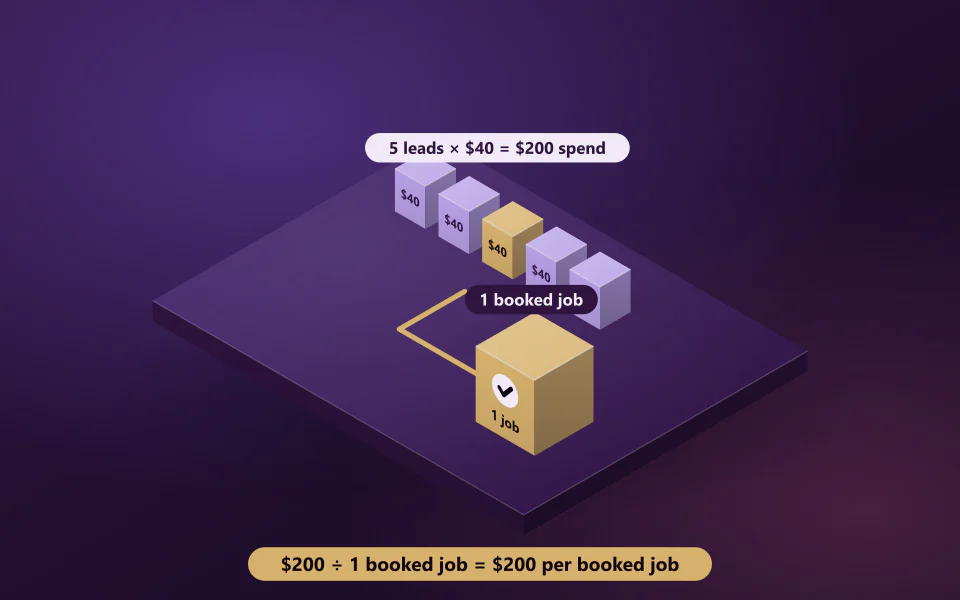
The worksheet
Prefer not to work it out by hand? Our free cost per booked job calculator runs this comparison for any two channels, using the same example numbers.
Fill in one column per channel for the same period, ideally a full month. Use leads from Google Ads (with call and form tracking set up) for Search, and from the Leads page for pay-per-lead (or your Local Services Ads dashboard if you haven't migrated). Book rate comes from your job records, not from Google.
| Line | How to work it out | Search (per click) | Pay-per-lead |
|---|---|---|---|
| A. Ad spend | From Google Ads (or your Local Services Ads dashboard if you haven't migrated) for the period | ||
| B. Leads | Calls, forms, messages and bookings you received | ||
| C. Cost per lead | A ÷ B | ||
| D. Booked jobs | Leads that became paid work | ||
| E. Book rate | D ÷ B | ||
| F. Cost per booked job | A ÷ D | ||
| G. Profit per job before ad costs | Average job revenue minus materials, labor and other direct costs | ||
| H. Profit after ad spend | (D × G) − A | ||
| I. Break-even cost per lead | G × E |
- How to work it out
- From Google Ads (or your Local Services Ads dashboard if you haven't migrated) for the period
- Search (per click)
- Pay-per-lead
- How to work it out
- Calls, forms, messages and bookings you received
- Search (per click)
- Pay-per-lead
- How to work it out
- A ÷ B
- Search (per click)
- Pay-per-lead
- How to work it out
- Leads that became paid work
- Search (per click)
- Pay-per-lead
- How to work it out
- D ÷ B
- Search (per click)
- Pay-per-lead
- How to work it out
- A ÷ D
- Search (per click)
- Pay-per-lead
- How to work it out
- Average job revenue minus materials, labor and other direct costs
- Search (per click)
- Pay-per-lead
- How to work it out
- (D × G) − A
- Search (per click)
- Pay-per-lead
- How to work it out
- G × E
- Search (per click)
- Pay-per-lead
Worked example (hypothetical)
Take a hypothetical plumbing company that spends $1,200 a month on each channel. Its average job brings in $400 and leaves $200 of profit before ad costs (a 50% margin). The book rates below are invented to show the method. They are not a claim that either channel typically books better.
| Line | Search (per click) | Pay-per-lead |
|---|---|---|
| A. Ad spend | $1,200 (200 clicks × $6 average CPC) | $1,200 (30 charged leads × $40 average) |
| B. Leads | 20 (10% of 200 clicks contacted the business) | 30 |
| C. Cost per lead | $1,200 ÷ 20 = $60 | $1,200 ÷ 30 = $40 |
| D. Booked jobs | 10 | 6 |
| E. Book rate | 10 ÷ 20 = 50% | 6 ÷ 30 = 20% |
| F. Cost per booked job | $1,200 ÷ 10 = $120 | $1,200 ÷ 6 = $200 |
| G. Profit per job before ad costs | $200 | $200 |
| H. Profit after ad spend | (10 × $200) − $1,200 = $800 | (6 × $200) − $1,200 = $0 |
| I. Break-even cost per lead | $200 × 50% = $100 | $200 × 20% = $40 |
- Search (per click)
- $1,200 (200 clicks × $6 average CPC)
- Pay-per-lead
- $1,200 (30 charged leads × $40 average)
- Search (per click)
- 20 (10% of 200 clicks contacted the business)
- Pay-per-lead
- 30
- Search (per click)
- $1,200 ÷ 20 = $60
- Pay-per-lead
- $1,200 ÷ 30 = $40
- Search (per click)
- 10
- Pay-per-lead
- 6
- Search (per click)
- 10 ÷ 20 = 50%
- Pay-per-lead
- 6 ÷ 30 = 20%
- Search (per click)
- $1,200 ÷ 10 = $120
- Pay-per-lead
- $1,200 ÷ 6 = $200
- Search (per click)
- $200
- Pay-per-lead
- $200
- Search (per click)
- (10 × $200) − $1,200 = $800
- Pay-per-lead
- (6 × $200) − $1,200 = $0
- Search (per click)
- $200 × 50% = $100
- Pay-per-lead
- $200 × 20% = $40
On cost per lead, pay-per-lead looks like the clear winner: $40 against $60. On cost per booked job, it's the other way around: $200 against $120. And at a 20% book rate, the pay-per-lead campaign is exactly at break-even. Every dollar it spends comes back as job profit, with nothing left over.
Now suppose the same company finds that many of its pay-per-lead calls were going to voicemail. It starts answering faster and returning missed calls straight away, and its book rate on those leads rises from 20% to 40%. Same spend, same price per lead:
| Line | Pay-per-lead, before | Pay-per-lead, after faster response |
|---|---|---|
| Leads | 30 | 30 |
| Book rate | 20% | 40% |
| Booked jobs | 30 × 20% = 6 | 30 × 40% = 12 |
| Cost per booked job | $1,200 ÷ 6 = $200 | $1,200 ÷ 12 = $100 |
| Profit after ad spend | (6 × $200) − $1,200 = $0 | (12 × $200) − $1,200 = $1,200 |
| Break-even cost per lead | $200 × 20% = $40 | $200 × 40% = $80 |
- Pay-per-lead, before
- 30
- Pay-per-lead, after faster response
- 30
- Pay-per-lead, before
- 20%
- Pay-per-lead, after faster response
- 40%
- Pay-per-lead, before
- 30 × 20% = 6
- Pay-per-lead, after faster response
- 30 × 40% = 12
- Pay-per-lead, before
- $1,200 ÷ 6 = $200
- Pay-per-lead, after faster response
- $1,200 ÷ 12 = $100
- Pay-per-lead, before
- (6 × $200) − $1,200 = $0
- Pay-per-lead, after faster response
- (12 × $200) − $1,200 = $1,200
- Pay-per-lead, before
- $200 × 20% = $40
- Pay-per-lead, after faster response
- $200 × 40% = $80
Nothing changed in the ad account, yet the cost per booked job halved and the campaign went from break-even to $1,200 of profit. That's the point of the worksheet: it shows you whether to fix the channel, the bidding or the phones. To test what a given budget could produce on the Search side, try our Google Ads budget calculator.
When Each One Makes More Sense
Pay-per-lead tends to suit you when
- You're in an eligible US home or storefront service category and can pass Google's verification.
- Your Google Business Profile is verified and accurate, with a steady flow of reviews. Google's best-practice page says ratings above four stars "can help your business stand out" and to "Aim for 5 or more reviews on your Google Business Profile."
- Someone answers the phone during your ad hours. Missed calls during business hours where the caller stays on the line for more than 20 seconds still cost you, and Google says the ad schedule defaults to run "All the time", so check it matches when you can actually answer.
- You don't have the time or budget to manage keywords, ad copy and landing pages.
Google Ads Search tends to suit you when
- You want to choose exactly which searches you pay for, and exclude the ones you don't (cheap repairs, DIY questions, jobs you don't do).
- Your most profitable work is a specific service you want to push, with its own landing page.
- Your category isn't eligible for pay-per-lead yet, or Local Services Ads aren't offered in your area.
- You already have reliable call and form tracking, so you can see cost per lead and book rate for yourself.
If you're comparing what each will cost to manage, our breakdown of Google Ads management costs explains what agencies typically charge for and what to ask before you sign.
Running Both
Many local businesses run both, and Google's pay-per-lead page recommends running these campaigns "alongside Search, Performance Max and Demand Gen" campaigns. The ads appear in different places: pay-per-lead ads keep their Local Services Ads positions on Search and Maps, and your Search campaign's text ads compete separately.
For Search campaigns and ordinary Performance Max campaigns competing for the same search, Google's rule is that a Search campaign keyword that exactly matches (or is spell-corrected to) the query is preferred; otherwise, the campaign with the higher Ad Rank serves. Google's pay-per-lead pages don't say whether that rule applies to pay-per-lead goals, which use separate ad positions, so we wouldn't plan around it either way.
One setting to know about is Direct Business Search. Google describes it as a feature for customers "who search specifically for your brand or business name". When it's on, "your ad is the only local ad eligible to appear on these brand searches", and Google asks callers whether they're returning customers so that you're "only charged for leads from new customers." It can be turned on or off in your campaign settings under "Profile and Budget". If you also bid on your business name in a Search campaign, put both in the worksheet and keep whichever costs less per booked job.
Getting the Pay-per-Lead Side Right

Most of what decides pay-per-lead results lives outside the ad settings. Google's best-practice guidance for pay-per-lead goals comes down to a handful of things:
- A verified Google Business Profile. Google's pay-per-lead page says "You must have at least one verified Google Business Profile", and its best-practice page says "Keep your Google Business Profile verified and updated", with your name, address, phone number and service categories accurate and edits made on the profile itself. Our Google Business Profile optimization guide walks through it.
- Reviews: aim for five or more, with ratings above four stars.
- Response: answer calls promptly during your ad hours, reduce missed calls, return any you miss immediately, and reply to messages quickly if you've opted in to message leads.
- Service areas: Google prefills them from your Business Profile and advises against boundaries "more than two hours of driving time from your business location." You can add or remove cities, counties or ZIP codes.
- Bidding: keep the default Maximize Conversions. Google says "Only set a Target CPA after campaign creation if your campaign is consistently receiving more than 15 leads per month".
- Patience with spend: Google's advice is "Don't be alarmed by daily spend fluctuations."
If your business doesn't appear on Google Maps at all, sort that out first. Our checklist for when your business is not showing up on Google Maps covers the usual causes.
UK and Outside the US
Local Services Ads do run in the UK, but on a narrower list. Google's UK getting-started page says "At this time, Local Services Ads are available only for certain service categories." Outside the Greater London-only legal and estate agent list, it names 28 service categories, including plumbers, electricians, roofers, HVAC, cleaning services, pest control, handyman, carpenters, landscaping, moving and tree services. Lawyer and estate agent categories are "Currently available in Greater London only". The badge is the same Google Verified badge.
- Migration timing: Google's transition page puts non-US accounts in the 2027 phase, and the pay-per-lead page requires a business located and operating in the US. UK advertisers stay on Local Services Ads as they are for now.
- Lead credits: Google's How leads work page says lead credits aren't available for advertisers in EMEA, which includes the UK.
- VAT: when you fill in the worksheet, use job revenue and costs excluding VAT, because that money isn't yours.
Migration Readiness Check
If you run Local Services Ads in the US today, these are the things to settle before (or soon after) your account moves. Answers stay in your browser.
Local Services Ads migration readiness check
Your answers stay in this browser tab. Nothing is sent, saved or tracked, and there's no score: just a list of what's in place and what to fix first.
Your result
Answer the questions above and your list appears here. Answer “Not sure” honestly: if you're not sure, assume it isn't in place.
Frequently Asked Questions
Are Local Services Ads going away?
Not in the sense of disappearing. Google is moving them into Google Ads as Performance Max campaigns with pay-per-lead goals. You still pay per valid lead and still appear on Google Search and Google Maps in the same positions; what goes is the separate Local Services Ads dashboard and some features, such as manual bidding and manual disputes.
Has my account already been migrated?
Only Google can tell you. Google's published timeline has the first phase beginning in August 2026 for select US advertisers, broader groups in late 2026, and non-US accounts and remaining categories in 2027, and its page doesn't say any phase is complete. Google emails the account administrator before migration, and afterwards, logging in to the old dashboard redirects you to Google Ads.
Are Local Services Ads cheaper than Google Ads?
There's no general answer, and we don't quote industry averages because they vary too much by trade and city to help you decide. Compare the two with your own numbers on cost per booked job. In our hypothetical example the channel with the cheaper lead was the more expensive one per job.
Can I still set a maximum cost per lead?
Not after migration. Google says manual bidding, such as setting a maximum cost per lead, is no longer supported in Google Ads. Maximize Conversions is the default, and Google advises a Target CPA only for campaigns consistently getting more than 15 leads a month.
Do I keep my Google Verified badge?
Google says your verified status and Google Verified badge transfer to Google Ads automatically. Keep your Google Business Profile verified and linked, because Google ties the badge on your ad to that profile.
Can I dispute a bad lead?
Not manually once you've migrated: Google says manual lead disputes are no longer supported. Leads Google determines to be invalid or low quality aren't charged. Lead credits aren't available for advertisers in EMEA.
Can I create a new pay-per-lead campaign in Google Ads?
Not yet. Google says you can't create new campaigns with pay-per-lead goals directly within Google Ads at this time, and that this will become available later. For now, Google directs new campaigns to Local Services.
What Should You Do Next?
This week: download your Local Services Ads reports if you're in the US and haven't migrated yet, and start logging which leads book. Next month: fill in the worksheet for every channel you run. Then put more budget behind whichever one has the lower cost per booked job, and fix response times before you blame the ads.
Want help comparing your Search and pay-per-lead campaigns, or getting ready for the migration? Social Stellor manages Google Ads and Google Business Profiles for local service businesses in the US and UK.
Talk to Us About Google AdsSee what ongoing management includes on our Google Ads and Google Business Profile service pages.
Sources and Further Reading
All sources were checked on November 24, 2026. Google is still rolling out the migration and updates its help pages without notice, so check them for current details. Example businesses, budgets and calculations are hypothetical illustrations, not client results or benchmarks.
- Google Ads Help, "Local Services Ads transition to Performance Max campaigns with pay-per-lead goals" (opens in new tab)
- Google Ads Help, "About pay-per-lead goals for Performance Max campaigns" (opens in new tab)
- Google Ads Help, "Best practices for pay-per-lead goals for Performance Max campaigns" (opens in new tab)
- Google Ads Help, "About targeting for pay-per-lead goals for Performance Max" (opens in new tab)
- Local Services Help, "How leads work" (opens in new tab)
- Google Ads Help, "Cost-per-click (CPC): Definition" (opens in new tab)
- Google Ads Help, "How Performance Max interacts with other campaigns in your account" (opens in new tab)
- Local Services Help, "Getting started with Local Services Ads – United Kingdom" (opens in new tab)


Free tools for this topic
- Google Ads Budget PlannerTurn a conversion goal into a monthly and daily Google Ads budget, and check it against what each customer is worth to you.
- Cost Per Booked Job CalculatorCheaper leads don't always mean cheaper jobs. Compare two channels, such as Google Search and Local Services Ads, on what each booked job actually costs you.
Related articles


Google Ads15 min read
Google Ads Management Costs Explained
Understand the three parts of every quote (ad spend, management fees and setup) and how to compare proposals fairly.


Google Ads16 min read
SEO vs Google Ads: Which Comes First?
Compare speed, cost and staying power to decide where your first marketing dollar goes, and when to run both.

SEO15 min read
Google Business Profile Optimization: 15 Steps
Fifteen practical steps, a 30-day plan and a measurement routine to win more customers from your Business Profile.
Get new guides as they publish.
Follow our RSS feed in any feed reader, such as Feedly or Inoreader. No email address needed.
Follow by RSSOr browse everything we've published on the blog.